ZUSMPP Manual – Submit Logs
Location: Main Menu → Submit Logs
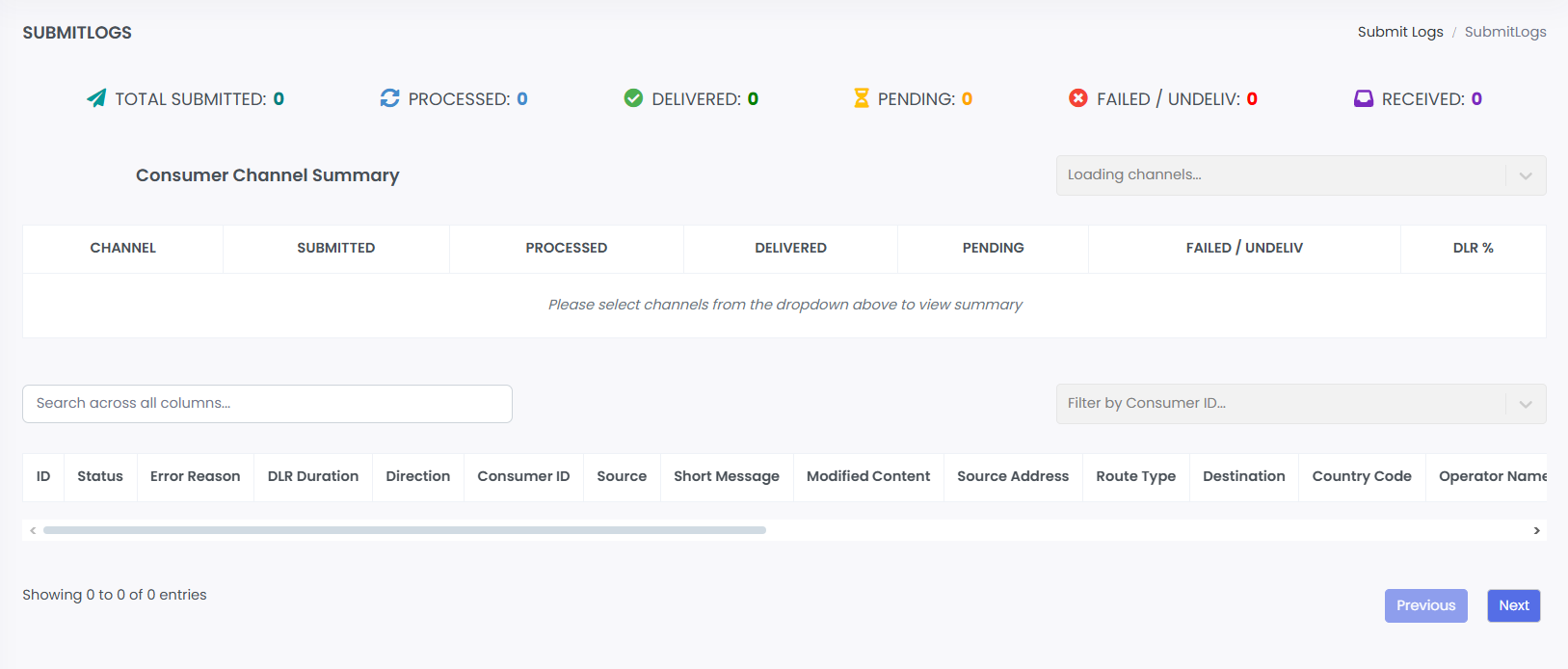
Real-time monitoring page for SMS message traffic and delivery status. Displays live counts and detailed logs of submitted messages.
1. Summary Metrics
· Total Submitted: Total messages sent.
· Processed: Messages accepted by the system.
· Delivered: Successfully received messages.
· Pending: Messages in queue.
· Failed / Undelivered: Messages that could not be delivered.
· Received: Incoming messages received.
2. Consumer Channel Summary
· Dropdown to select specific channels.
· Table shows per-channel breakdown of submitted, processed, delivered, pending, failed, and DLR percentage.
· Used for performance tracking by channel.
3. Submit Logs Table
· Detailed log of all message transactions.
· Columns: ID, Status, Error Reason, DLR Duration, Direction, Consumer ID, Source, Short Message, Modified Content, Source Address, Route Type, Destination, Country Code.
· Search bar for filtering across all columns.
· Filter by Consumer ID option.
4. Features
· Real-time data updates.
· Filter and search for specific messages or errors.
· Monitor delivery performance and troubleshoot failures.